

-


移动开发
站-
热门城市 全国站>
-
其他省市
-
-

 400-808-3611
 白羽
2018-06-27
来源 :网络
阅读 1922
评论 0
白羽
2018-06-27
来源 :网络
阅读 1922
评论 0
摘要:本文将带你了解Android开发之如何使用文件初始化sqlite数据库,希望本文对大家学Android有所帮助。
很多时候在应用安装初始化时,需要创建本地数据库,同时为数据库添加数据,之后再从数据库中读取数据。
这里有2个思路
1.先在本地创建一个能支持android使用的sqlite数据库文件,启动时,用现成的sqlite的二进制文件进行直接copy到Android系统的数据库路径
2.可以考虑在第一次启动时,执行数据库初始化的sql文件.
1.在本地准备android能使用的sqlite数据库文件
使用sqlite数据库管理工具,看个人爱好(SQLite Database Browser ,Navicat Premium,)
打开数据库,创建"android_metadata"数据表
Sql代码
1. CREATE TABLE "android_metadata" ("_id" INTEGER PRIMARY KEY AUTOINCREMENT,"locale" TEXT DEFAULT ‘en_US‘);//创建表
2. INSERT INTO "android_metadata" VALUES (1,‘en_US‘);//插入值
创建其他应用需要的表..此处省略.
2.复制文件到应用中.
把第一步创建的数据库文件复制到应用中的assets文件夹, asserts文件夹的路径如下:
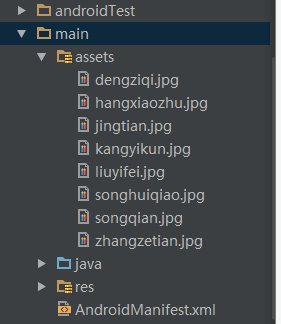
然后创建DateBaseHelper extends SQLiteOpenHelper的类文件.
代码如下:
Java代码
1. public class DataBaseHelper extends SQLiteOpenHelper {
2.     //The Android‘s default system path of your application database.
3.     private static String DB_PATH = "/data/data/YOUR_PACKAGE/databases/";
4.     private static String DB_NAME = "myDBName";
5.     private SQLiteDatabase myDataBase;
6.     private final Context myContext;
7.     /**
8.      * Constructor
9.      * Takes and keeps a reference of the passed context in order to access to the application assets and resources.
10.      * @param context
11.      */
12.     public DataBaseHelper(Context context) {
13.         super(context, DB_NAME, null, 1);
14.         this.myContext = context;
15.     }
16.
17.     /**
18.      * Creates a empty database on the system and rewrites it with your own database.
19.      * */
20.     public void createDataBase()throws IOException {
21.         boolean dbExist = checkDataBase();
22.         if (dbExist) {
23.             //do nothing - database already exist
24.         } else {
25.             //By calling this method and empty database will be created into the default system path
26.             //of your application so we are gonna be able to overwrite that database with our database.
27.             this.getReadableDatabase();
28.             try {
29.                 copyDataBase();
30.             } catch (IOException e) {
31.                 throw new Error("Error copying database");
32.             }
33.         }
34.     }
35.
36.     /**
37.      * Check if the database already exist to avoid re-copying the file each time you open the application.
38.      * @return true if it exists, false if it doesn‘t
39.      */
40.     private boolean checkDataBase() {
41.         SQLiteDatabase checkDB = null;
42.         try {
43.             String myPath = DB_PATH + DB_NAME;
44.             checkDB = SQLiteDatabase.openDatabase(myPath, null, SQLiteDatabase.OPEN_READONLY);
45.         } catch (SQLiteException e) {
46.             //database does‘t exist yet.
47.         }
48.
49.         if (checkDB != null) {
50.             checkDB.close();
51.         }
52.         return checkDB != null ? true : false;
53.     }
54.
55.     /**
56.      * Copies your database from your local assets-folder to the just created empty database in the
57.      * system folder, from where it can be accessed and handled.
58.      * This is done by transfering bytestream.
59.      * */
60.     private void copyDataBase()throws IOException {
61.         //Open your local db as the input stream
62.         InputStream myInput = myContext.getAssets().open(DB_NAME);
63.         // Path to the just created empty db
64.         String outFileName = DB_PATH + DB_NAME;
65.         //Open the empty db as the output stream
66.         OutputStream myOutput = new FileOutputStream(outFileName);
67.         //transfer bytes from the inputfile to the outputfile
68.         byte[]buffer = new byte[1024];
69.         int length;
70.         while ((length = myInput.read(buffer)) > 0) {
71.             myOutput.write(buffer, 0, length);
72.         }
73.
74.         //Close the streams
75.         myOutput.flush();
76.         myOutput.close();
77.         myInput.close();
78.     }
79.
80.     public void openDataBase()throws SQLException {
81.         //Open the database
82.         String myPath = DB_PATH + DB_NAME;
83.         myDataBase = SQLiteDatabase.openDatabase(myPath, null, SQLiteDatabase.OPEN_READONLY);
84.     }
85.
86.     @Override
87.     public synchronized void close() {
88.         if (myDataBase != null)
89.             myDataBase.close();
90.         super.close();
91.     }
92.
93.     @Override
94.     public void onCreate(SQLiteDatabase db) {}
95.
96.     @Override
97.     public void onUpgrade(SQLiteDatabase db, int oldVersion, int newVersion) {}
98.     // Add your public helper methods to access and get content from the database.
99.     // You could return cursors by doing "return myDataBase.query(....)" so it‘d be easy
100.     // to you to create adapters for your views.
101. }

3.现在我们可以创建DateBaseHelper的实现操作了.
createDataBase() //创建
openDataBase()//打开只读数据库
记得要更改"YOUR_PACKAGE"为你的应用的包名
如:com.examplename.myapp
大概代码如下:
Java代码
1. ...
2. DataBaseHelper myDbHelper = new DataBaseHelper();
3. myDbHelper = new DataBaseHelper(this);
4. try {
5.     myDbHelper.createDataBase();
6. } catch (IOException ioe) {
7.     throw new Error("Unable to create database");
8. }
9. try {
10.     myDbHelper.openDataBase();
11. } catch (SQLException sqle) {
12.     throw sqle;
13. }
14. ...
本文由职坐标整理并发布,希望对同学们有所帮助。了解更多详情请关注职坐标移动开发之Android频道!
 喜欢 | 0
 不喜欢 | 0


您输入的评论内容中包含违禁敏感词
我知道了

请输入正确的手机号码
请输入正确的验证码
您今天的短信下发次数太多了,明天再试试吧!
我们会在第一时间安排职业规划师联系您!
您也可以联系我们的职业规划师咨询:

版权所有 职坐标-一站式AI+学习就业服务平台 沪ICP备13042190号-4
上海海同信息科技有限公司 Copyright ©2015 www.zhizuobiao.com,All Rights Reserved.
 沪公网安备 31011502005948号







 资料领取
资料领取

 答疑解惑
答疑解惑

 技术交流
技术交流

 职业测评
职业测评

 面试技巧
面试技巧

 高薪秘笈
高薪秘笈




